
Por qué aparece un silencio entre dos canciones
Nueve de cada diez veces, el silencio no lo añade el reproductor: ya está en el archivo. La mayoría de las canciones terminan con una cola de reverberación seguida de uno a tres segundos de silencio digital, y empiezan con un breve silencio antes de la primera nota. Puestos uno detrás del otro, dos archivos producen un hueco de dos a cuatro segundos. La solución no es bajar el volumen al final: hay que cortar el audio antes de ese silencio y superponer los dos fragmentos, con un fundido encadenado o con un corte seco colocado justo en un tiempo.
Las tres pantallas que necesitas
Recortar, ajustar la unión y exportar. Nada que instalar y nada que calcular a mano.
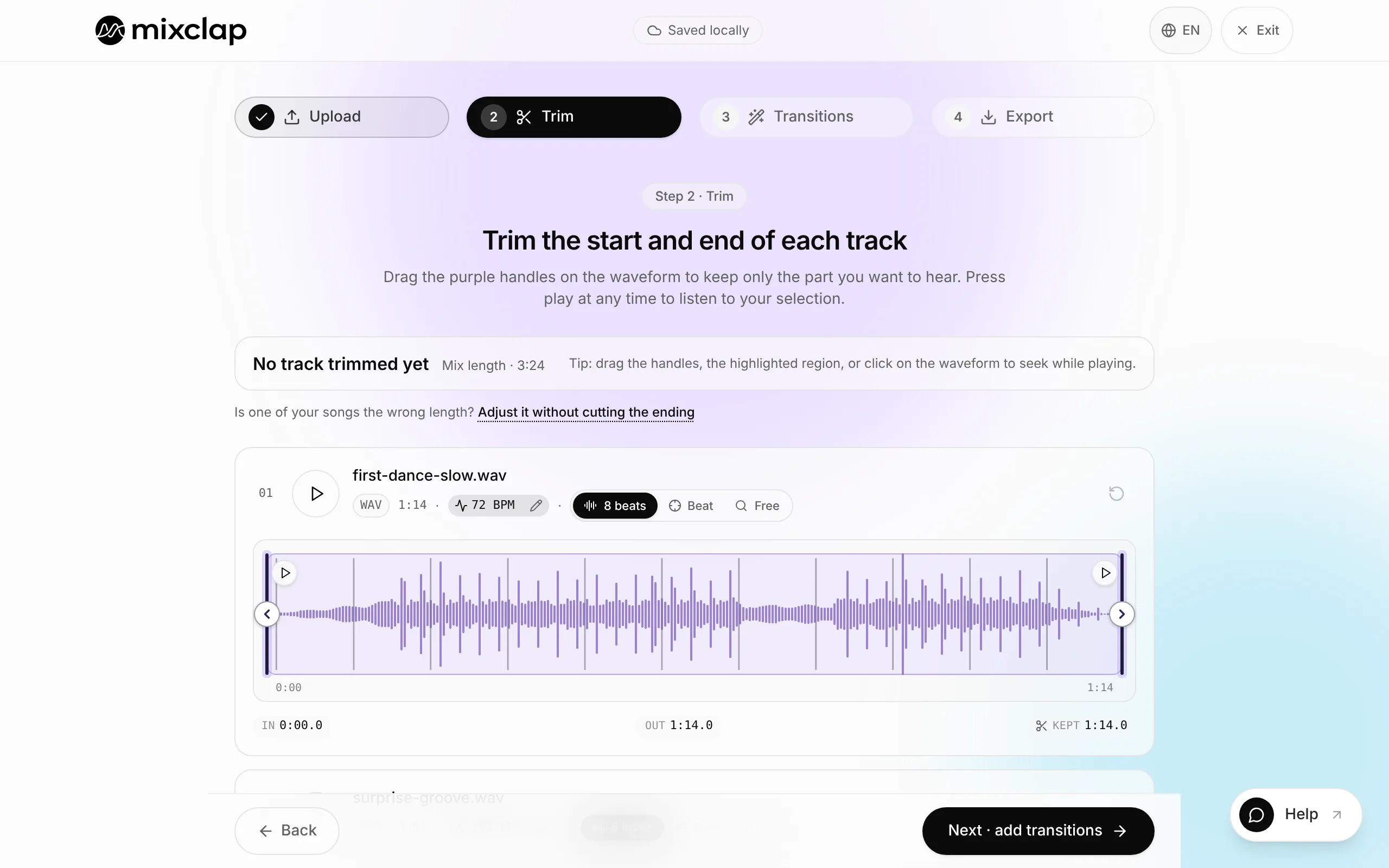
Elige en la forma de onda la salida de la primera canción y la entrada de la segunda. 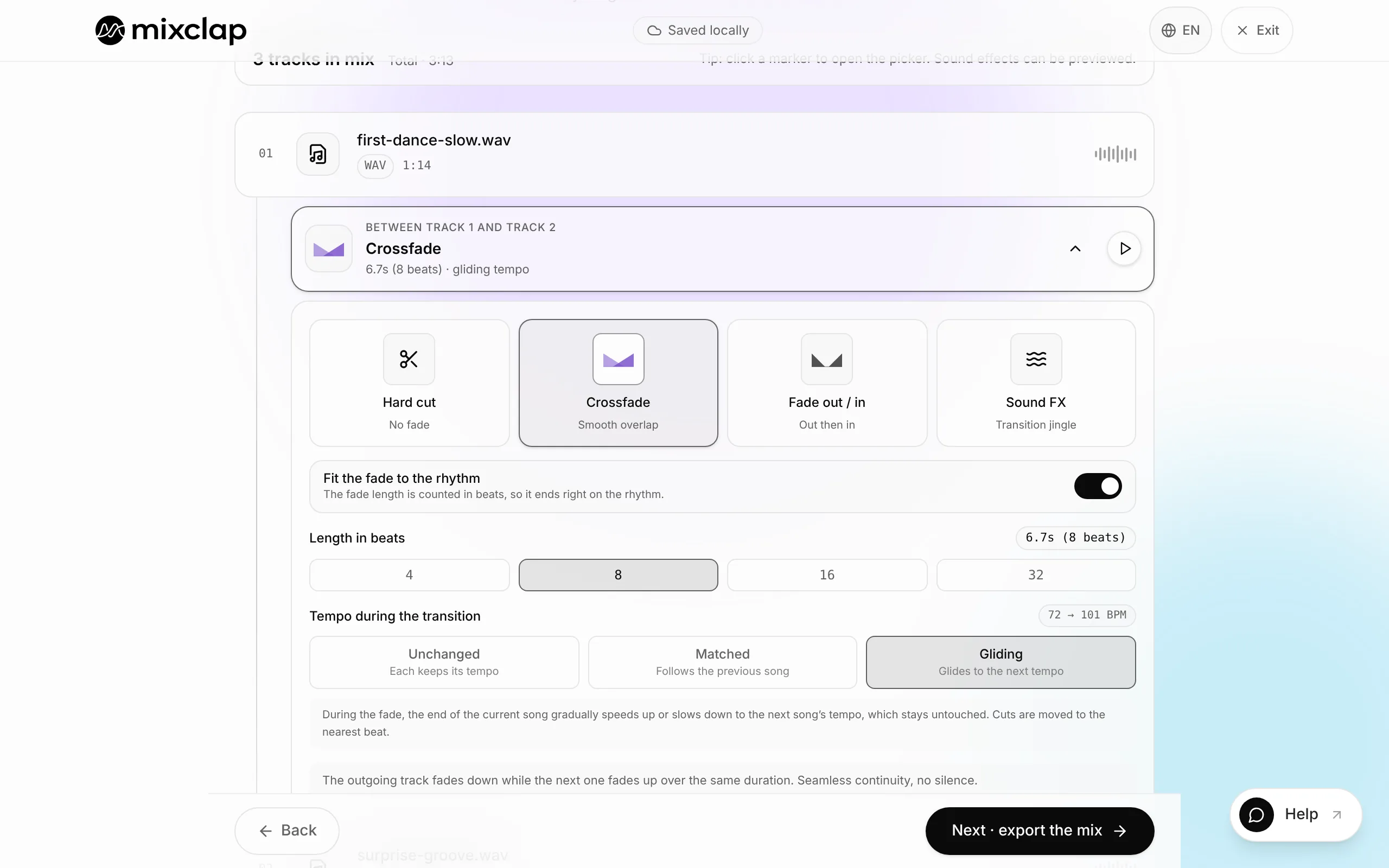
Ajusta la duración del fundido y escucha solo la unión. 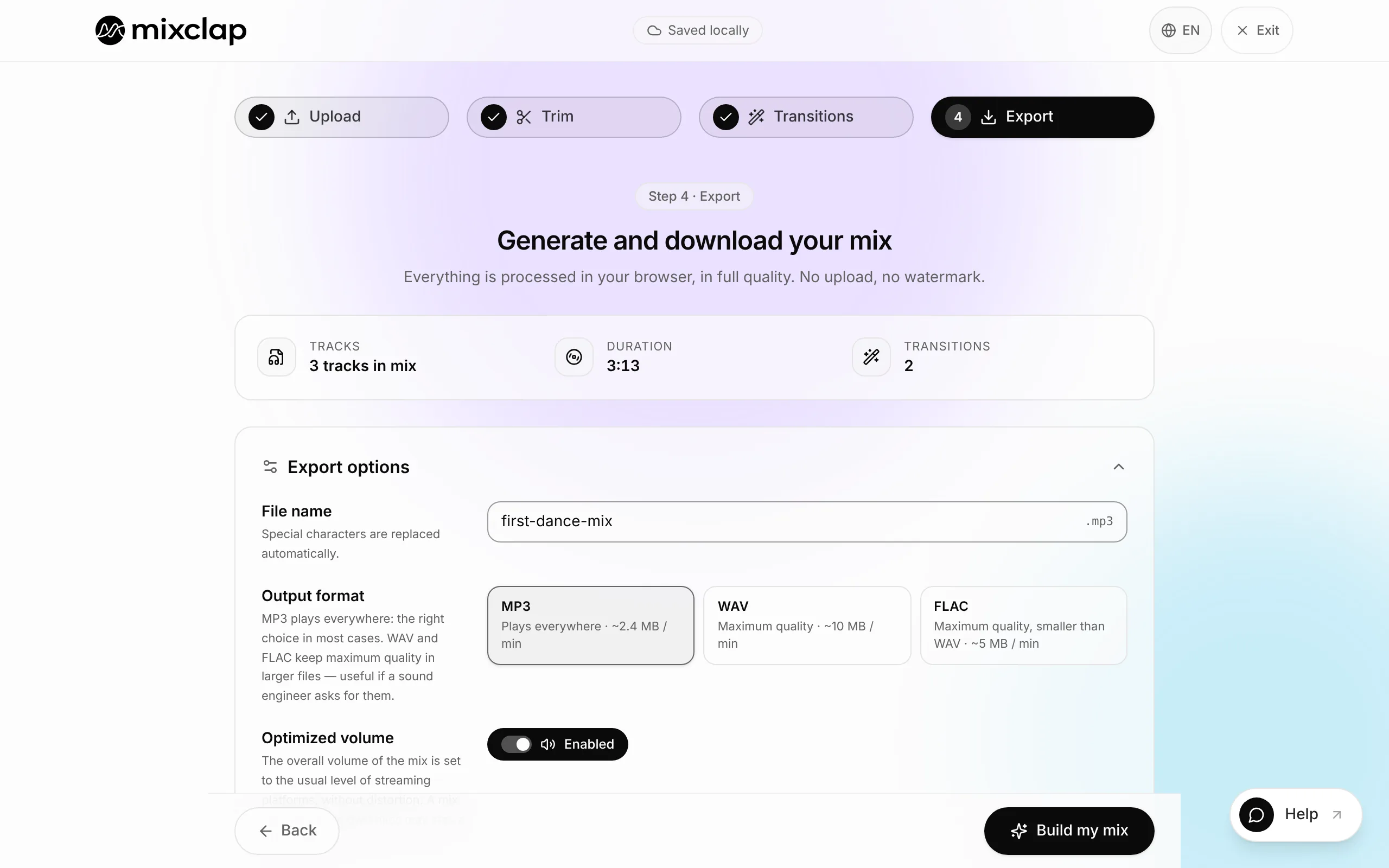
Exporta un único archivo, en MP3 de 320 kbps o en WAV.
El método en 4 pasos
Calcula diez minutos para una unión cuidada. Casi todo el trabajo está en elegir los dos puntos de corte; el resto es mecánico.
- 1
Elige la salida de la primera canción
Busca el final de una frase musical: la última sílaba de un estribillo, el último tiempo de un compás, la nota que precede a un break. Evita cortar en medio de una palabra o durante un pad que sube: el oído espera una resolución y el corte se nota.
- 2
Elige la entrada de la segunda canción
El punto de entrada más fiable es el primer tiempo de un compás, justo antes de una estrofa o un estribillo. Si la intro de la segunda canción es reconocible (un riff, un motivo de piano, una cuenta atrás), empieza ahí: es el momento en que el público identifica el tema.
- 3
Alinea los tempos si hace falta
MixClap muestra el BPM detectado de cada pista. Con menos de un 3 % de diferencia no hace falta ajustar nada. Entre un 3 y un 8 %, un ligero estiramiento del tempo basta para que coincidan los tiempos. Por encima, conserva los tempos originales y pasa a un corte seco: queda más limpio que una alineación forzada.
- 4
Ajusta el fundido, escucha y exporta
Ajusta la duración del fundido, escucha solo la unión en bucle y luego amplía la escucha diez segundos a cada lado para comprobar los niveles. Después exporta en MP3 de 320 kbps o en WAV.
¿Cuánto debe durar el fundido?
La duración correcta depende mucho menos del género que de lo que pasa realmente en la unión. La regla más fiable: cuantas más voces haya durante la superposición, más corto debe ser el fundido.
| Qué pasa en la unión | Duración recomendada | Por qué |
|---|---|---|
| Dos voces que se cruzan | 0,5 a 2 s | Más largo, la letra deja de entenderse |
| Final instrumental hacia intro instrumental | 4 a 8 s | El cruce pasa desapercibido |
| Primer baile de boda (2 canciones) | 6 a 10 s | Da tiempo a los bailarines a cambiar de ritmo |
| Cambio de tempo marcado | 0 s (corte seco) | Un fundido largo dejaría oír dos tempos a la vez |
| Entrada en una subida | 2 a 4 s | Lo bastante corto para mantener la tensión |
¿Dónde cortar exactamente?
Un buen corte cae en un límite musical, no en un número redondo de segundos. Tres referencias permiten encontrarlo rápido sin saber leer música.
- El tiempo fuerte: el pulso que marcarías con el pie. Una entrada en un tiempo fuerte suena intencionada, incluso si el tempo cambia.
- El inicio de compás: en la mayoría de la música popular, las secciones cambian cada 8 o 16 tiempos. Cortar en esos límites evita la sensación de frase interrumpida.
- El silencio previo al ataque: deja de 20 a 50 milisegundos antes de la primera nota del segundo fragmento; si no, el ataque se recorta y se oye un clic.
¿A mano en un editor o de forma automática?
Los dos enfoques dan un buen resultado; simplemente no cuestan el mismo tiempo. Un editor de audio generalista te da el control total, pero tienes que localizar los tiempos fuertes a ojo y calcular tú los desfases. Una herramienta dedicada detecta el tempo y los tiempos y coloca la unión por ti.
| Criterio | Editor de audio generalista | MixClap |
|---|---|---|
| Instalación | Programa que instalar | Navegador, nada que instalar |
| Detección del BPM | Manual o con un plugin | Automática al importar |
| Alineación de los tiempos | La calculas tú | Propuesta automáticamente |
| Escucha antes de validar | Sí | Sí, la mezcla completa |
| Dónde están los archivos | En tu disco | En tu dispositivo, nunca se envían |
| Coste | De gratis a caro según el programa | Pago por exportación |
Dos canciones, dos volúmenes distintos
Es el segundo defecto más frecuente después del silencio. Los niveles de producción han cambiado mucho: un tema reciente puede sonar bastante más fuerte que uno antiguo aunque los dos archivos muestren el mismo pico. El volumen percibido depende del nivel medio, no del pico.
Normaliza las dos pistas a un objetivo común antes de unirlas, en lugar de corregir el volumen a oído durante el fundido.
Cuándo bastan dos canciones
Muchos proyectos no necesitan un medley completo. Dos temas bien unidos cubren la mayoría de los momentos clave de un evento.
Preguntas frecuentes
¿Cómo unir dos canciones sin silencio?
Corta la primera canción antes de su silencio final, empieza la segunda en un tiempo fuerte y superpón los dos fragmentos con un fundido encadenado. Sin superposición, siempre vuelve un hueco de uno a tres segundos, porque está dentro de los propios archivos.
¿Cuánto debe durar el fundido encadenado?
De 0,5 a 2 segundos cuando se cruzan dos voces, de 4 a 8 segundos entre un final instrumental y una intro instrumental, de 6 a 10 segundos para un primer baile de boda. Ante un cambio de tempo marcado, mejor un corte seco en un tiempo fuerte que un fundido.
¿Las dos canciones deben tener el mismo BPM?
No. Con menos de un 3 % de diferencia basta el fundido. Entre un 3 y un 8 %, un ligero estiramiento del tempo alinea los tiempos sin deformar las voces. Por encima del 8 %, conserva los tempos originales y corta limpio en un tiempo fuerte.
¿Se pueden unir dos canciones directamente en el navegador?
Sí. MixClap importa archivos MP3, WAV, M4A y FLAC, detecta su tempo, propone la alineación de los tiempos y te deja escuchar la unión antes de exportar. El procesamiento de audio se hace en tu dispositivo: ningún archivo se envía a un servidor y no hace falta cuenta.
¿Cómo evito que la segunda canción suene más fuerte?
Normaliza las dos pistas a un mismo objetivo de sonoridad antes de unirlas. La diferencia percibida viene del nivel medio, no del pico: dos archivos pueden tener el mismo pico y sonar muy distintos.
¿Qué formato exportar para un DJ o una cabina de sonido?
WAV de 16 bits si el archivo se va a reproducir desde una cabina o una consola, MP3 de 320 kbps si hay que enviarlo por correo o por una app de mensajería. Pon en el nombre del archivo el título, la duración exacta y el momento previsto.
Dos canciones, una transición limpia
Importa los dos temas, coloca la unión y escúchala en bucle hasta que suene bien. Solo pagas cuando exportas.
Unir mis dos canciones